
Condition
Actions up to “Otherwise” run when the check holds.
- Where
- + Add actionFlowCondition
- Comes with
- Otherwise, End condition, added and removed as one set
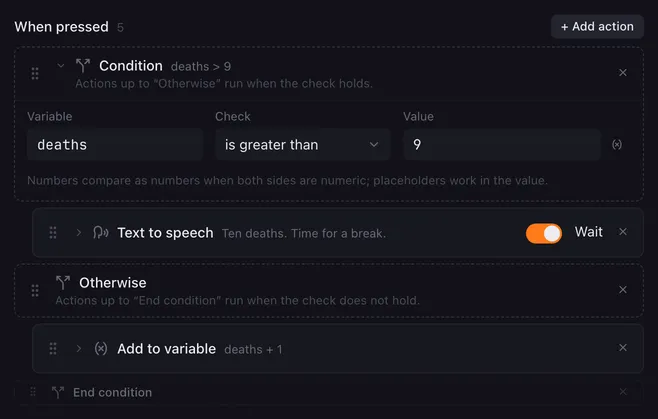
A condition checks a variable when the macro reaches it and picks what runs next. For example: once the death counter passes 9, say “Time for a break”; otherwise just count up.
The three markers
Section titled “The three markers”Adding a condition adds three rows at once:
- Condition: holds the check. The actions below it, up to Otherwise, run when the check holds.
- Otherwise: the actions between it and End condition run when the check does not hold. Leave this part empty if nothing should happen.
- End condition: everything after it runs either way.
Drag other actions between the markers to put them in a branch. The markers keep their order and cannot be dragged past each other. Removing one of them removes all three; the actions in between stay.
Settings
Section titled “Settings”| Setting | What it does |
|---|---|
| Variable | The name of the variable to check, without braces: one of yours such as deaths, a built-in value such as velocity, x, y or pageId, a fader level such as fader.volume, or a saved answer such as weather.status. A variable that is not set counts as empty. |
| Check | equals, does not equal, contains, starts with, ends with, is greater than, is less than, is empty, is not empty or matches regex. |
| Value | What to compare with. Placeholders work here, for example {{limit}}. Not shown for is empty and is not empty. |
How the check works
Section titled “How the check works”- When both sides are numbers, they compare as numbers:
10equals10.0, and100is greater than99. - Otherwise they compare as text, with upper and lower case counting as different. is greater than and is less than then compare alphabetically.
- is empty and is not empty ignore spaces.
- matches regex takes a regular expression, for example
^scene-\d+$. It matches anywhere in the text unless you anchor it with^and$. An invalid expression never matches.
How it runs
Section titled “How it runs”- The check uses the variable’s value at the moment the macro reaches the Condition row, so an action above it can set the value first.
- You can put a condition inside a branch of another condition.
Example
Section titled “Example”The death counter from the screenshot, on one button:
- Condition:
deathsis greater than9 - Text to speech: “Ten deaths. Time for a break.”
- Otherwise
- Add to variable:
deaths, add1 - End condition
Related
Section titled “Related”- Variables and placeholders — where values come from
- Set variable and Add to variable
- Run script — for checks a single comparison cannot express
- Flip flop — alternate without a variable