
Set variable
Remember a value for later actions.
- Where
- + Add actionSystemSet variable
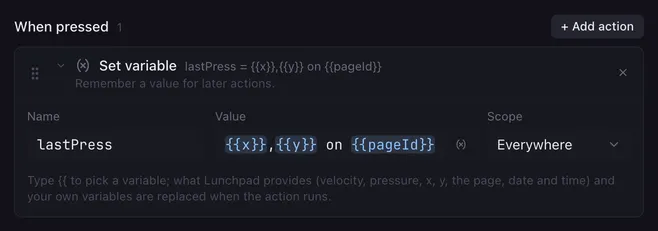
Set variable stores a value under a name. Later actions use it as a {{placeholder}}, and conditions can check it. Use it to remember a state (which scene you picked last, whether a mode is on) or to pass a value from one button to another.
Settings
Section titled “Settings”| Setting | What it does |
|---|---|
| Name | The variable’s name. Suggestions show names you already use. |
| Value | What to store. Type {{ to pick a variable; placeholders are replaced when the action runs. |
| Scope | This run: only this macro and the buttons it calls with Run another button. Everywhere: shared by all macros. |
How it runs
Section titled “How it runs”- The action is instant. The value is stored as text.
- Shared (Everywhere) variables are saved in the config folder (
variables.json) and are still there after Lunchpad restarts. This run variables are gone when the macro ends. - When a name exists in both scopes, the macro sees this run’s value.
- The built-in names
velocity,velocity01,pressure,pressure01,x,yandpageIdalways win in placeholders. Do not name your own variables like that. - An empty name does nothing. Spaces around the name are ignored.
- Writing
fader.<name>with Everywhere moves that fader, for examplefader.volumeto50. See faders.
Example
Section titled “Example”Remember which scene a button picked, so another button can switch back to it:
- On each scene button: Switch scene followed by Set variable
lastScene=Gameplay(Everywhere). - On a “back” button: Switch scene with the scene name
{{lastScene}}.
Related
Section titled “Related”- Add to variable — counters
- Run script — compute a value
- Variables and placeholders