
Turn on or off
Turn any entity on or off, or toggle it.
- Where
- + Add actionHome AssistantHome Assistant: on / off
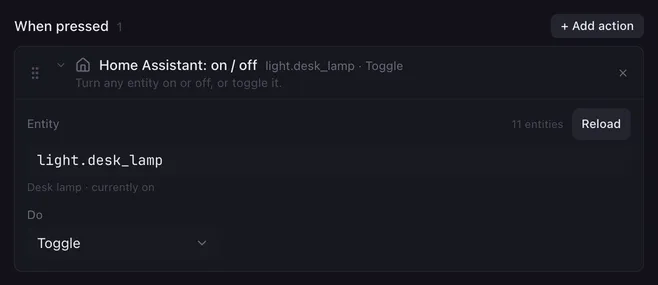
The simplest Home Assistant action: one pad for the desk lamp, one for the “on air” sign, one for the fan. It works for every kind of entity that can be switched, because it uses Home Assistant’s general homeassistant.turn_on, turn_off and toggle services rather than the ones of a single domain. Lights, switches, fans, media players, scripts and automations all answer to it.
Settings
Section titled “Settings”| Setting | What it does |
|---|---|
| Entity | The entity id, for example light.desk_lamp. Start typing and Lunchpad suggests entities by id or name. Below the field it shows the entity’s name and its state when the list was last loaded. |
| Reload | Loads the entity list from Home Assistant again, for entities you added since. The count next to it shows how many Lunchpad knows, or Not connected. |
| Do | Turn on, Turn off or Toggle. |
You can type an entity id that is not in the list, for example while Home Assistant is offline. It is sent as typed.
How it runs
Section titled “How it runs”- The action sends one service call to Home Assistant and goes on when Home Assistant has answered.
{{placeholders}}work in the entity, solight.{{room}}_lamppicks the lamp from a variable.- If Home Assistant cannot be reached or refuses the call (unknown entity, rejected token), the reason goes to the log and shows as the status under Settings → Home Assistant. The macro goes on with the next action.
Related
Section titled “Related”- Set a value — brightness, position, volume and more
- Call a service — anything else Home Assistant can do
- Home Assistant — connecting Lunchpad