
Trigger hotkey
Fire one of OBS Studio's hotkeys over the websocket, without giving OBS the focus.
- Where
- + Add actionOBS StudioOBS: trigger hotkey
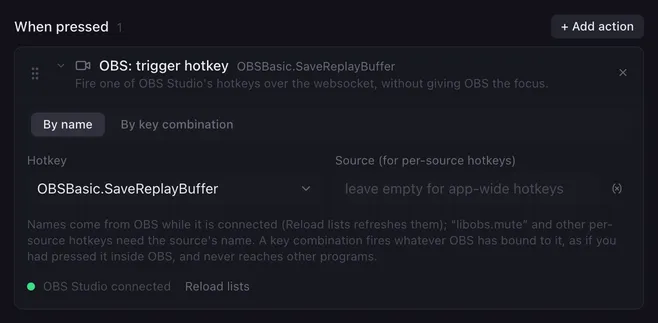
OBS Studio can do many things through its hotkeys that no other action covers: a screenshot, pausing the recording, a media source’s restart, a scene’s transition override, whatever a plugin registers. Trigger hotkey fires such a hotkey through obs-websocket. OBS does not need the focus, and no keystroke is typed anywhere, so the game or program you are in never sees it.
Settings
Section titled “Settings”| Setting | What it does |
|---|---|
| By name / By key combination | How the hotkey is picked. |
| Hotkey | The hotkey’s name in OBS, such as OBSBasic.StartStreaming or libobs.mute. The list comes from OBS while it is connected; Reload lists reads it again. Placeholders work. |
| Source | For per-source hotkeys (libobs.mute, MediaSource.Restart, …): the source’s name. Leave it empty for app-wide hotkeys. |
| Keys bound in OBS | Instead of a name: the key combination you assigned in OBS’s hotkey settings. Click the field and press the keys, pick a key your keyboard does not have from the list behind the arrow, or toggle the modifiers. |
How it runs
Section titled “How it runs”- By name fires the hotkey whether or not a key is bound to it in OBS.
- By key combination fires whatever OBS has bound to those keys, as if you had pressed them inside OBS. Keys other programs have bound are not affected.
- Names of app-wide hotkeys start with
OBSBasic.; per-source ones (libobs.,MediaSource., …) need the Source, otherwise OBS ignores them. - Errors (OBS not connected, unknown hotkey) are noted in the log and the macro goes on.
Examples
Section titled “Examples”Screenshot the output: By name, Hotkey OBSBasic.Screenshot.
Pause the recording while the pad is held: Trigger hotkey OBSBasic.PauseRecording in the pressed list, OBSBasic.UnpauseRecording in the released list.
Restart an intro video: Hotkey MediaSource.Restart, Source Intro.
Related
Section titled “Related”- Stream, record, replay
- Save replay
- Hotkey sequence — real keystrokes, for programs without an API