
Add to variable
Count up or down: add a number to a variable.
- Where
- + Add actionSystemAdd to variable
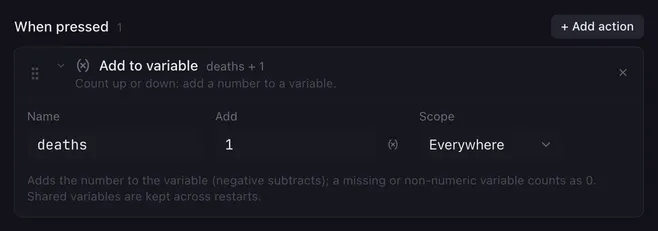
Add to variable turns a variable into a counter: deaths, wins, drinks, the number of times the chat said the magic word. Put a positive number in Add to count up and a negative one to count down.
Settings
Section titled “Settings”| Setting | What it does |
|---|---|
| Name | The variable to change. |
| Add | The number to add, or a placeholder that holds one. A negative number subtracts. |
| Scope | Where the result is stored: This run or Everywhere (the default for this action). See variables. |
How it runs
Section titled “How it runs”- A variable that does not exist yet, or does not hold a number, counts as 0. An Add value that is not a number adds 0.
- Whole results are stored without decimals (
4, not4.0); others keep up to three decimals. - The current value is read the way the macro sees it (this run’s value first, then the shared one) and the result is written to the chosen scope.
- Shared counters are saved and survive a restart of Lunchpad.
- On
fader.<name>with Everywhere, the fader moves by that amount:fader.volumewith-5turns a volume fader down a step. See faders.
Example
Section titled “Example”A death counter on two pads:
- “Deaths +1”: Add to variable
deaths, Add1, Everywhere, then Text to speech{{deaths}} deaths. - “Deaths −1”: Add to variable
deaths, Add-1, Everywhere.
Related
Section titled “Related”- Set variable — set an exact value
- Condition — react when a counter reaches a number
- Set fader — move a fader to an exact value