
HTTP request
Call a web address with any method, headers, body and login.
- Where
- + Add actionSystemHTTP request
- Wait
- Has a Wait switch: on, the next action starts once this one is done
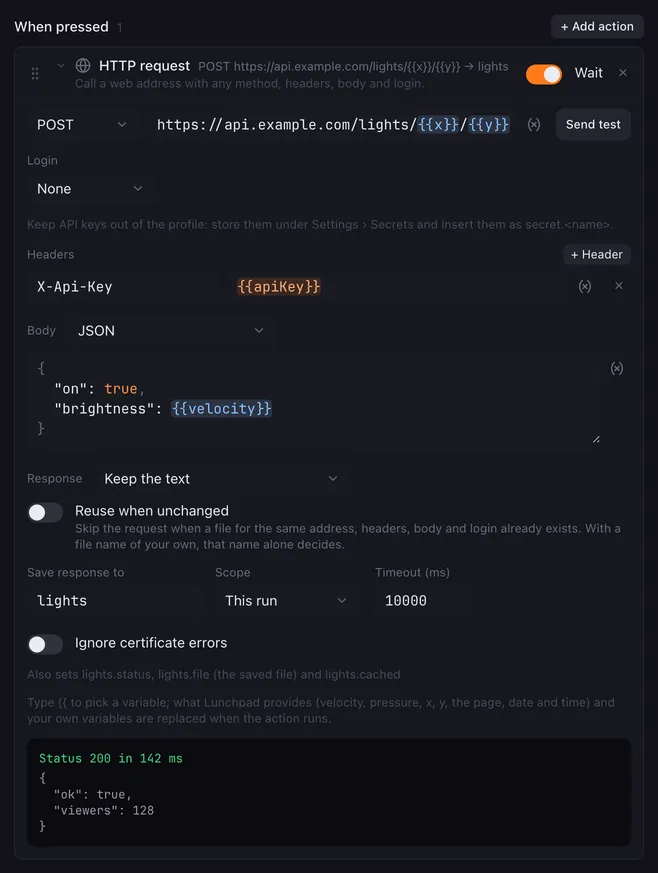
HTTP request calls a web address. Anything with a web API or webhook can be driven from a pad: smart lights, Home Assistant, Stream Deck-style web services, chat bots, Discord webhooks, your own server.
Settings
Section titled “Settings”| Setting | What it does |
|---|---|
| Method | GET, POST, PUT, PATCH, DELETE or HEAD. |
| URL | The address to call. |
| Send test | Sends the request now and shows the status, the time it took and the start of the answer. |
| Login | None, Username and password (basic authentication) or Bearer token. |
| Headers | Extra headers; add one with + Header. |
| Body | What to send and how. Not shown for GET and HEAD, which send no body. |
| Save response to | Stores the answer in this variable. |
| Scope | This run or Everywhere, see variables. |
| Response | What to do with the answer: keep the text, or save it as a file. See below. |
| Timeout (ms) | How long to wait for an answer, 500 to 120000 ms. The default is 10000. |
| Ignore certificate errors | Accepts self-signed or expired HTTPS certificates, for devices on your own network. |
The Body kinds:
| Kind | Sends |
|---|---|
| JSON | The text with Content-Type: application/json. |
| Form (urlencoded) | The text with Content-Type: application/x-www-form-urlencoded. |
| Plain text | The text with Content-Type: text/plain. |
| Custom content type | The text with the content type you type. |
| Form with files | multipart/form-data: one text field per name=value line, plus the files under Files (Field name, Path to the file). |
| File contents | The bytes of one file. The content type is guessed from the file name unless you type one. |
| No content type | The text without a content type header. |
A text body that is empty is not sent at all.
How it runs
Section titled “How it runs”{{placeholders}}work in the URL, header values, the body, the password, the bearer token, and the file paths and names. A placeholder with a name Lunchpad does not know is sent as typed.- With Wait on, the next action starts once the answer is in. Keep it on when the next actions use the saved response.
- When the macro is stopped, a request that is still waiting is cancelled.
- The saved variable holds the first 2 KB of the answer. Three more are set beside it, named like yours:
.statusholds the status code,.filethe saved file and.cachedwhether the file was reused (lights.status,lights.file,lights.cachedforlights). - Error codes such as 404 or 500 are saved like any other answer and noted in the log. When there is no answer at all (no connection, timeout, bad address), the variable is emptied and the status is
0. - Lunchpad identifies itself as
Lunchpad/plus its version in the User-Agent header.
Keeping the answer as a file
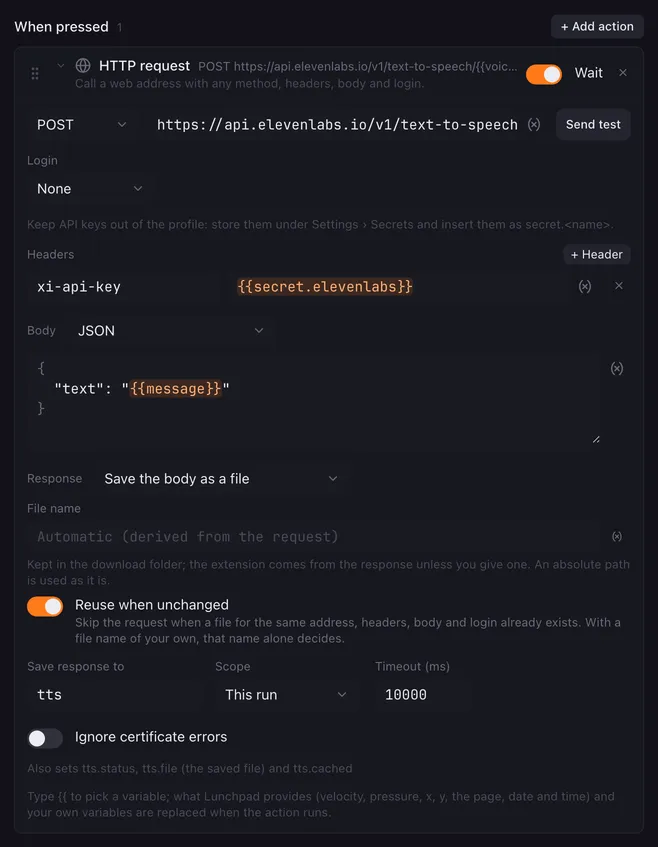
Section titled “Keeping the answer as a file”Some services answer with a file rather than a text: a voice service sends back the spoken audio, an image service a picture. Response decides what happens to the answer:
| Response | What Lunchpad does |
|---|---|
| Keep the text | The body goes into the variable, the first 2 KB of it. The normal case. |
| Save the body as a file | The answer is the file, for example the audio from a text-to-speech service. |
| Decode a base64 field | A field of the JSON answer holds the file as base64; a data: URL works too. |
| Download a URL from a field | A field of the JSON answer holds the address of the file, which Lunchpad then downloads. |
The two field modes add a Field: a dotted path into the answer, such as audioContent or data.0.url. Left empty, the whole body is used.
| Setting | What it does |
|---|---|
| File name | Empty names the file after the request itself. A plain name lands in the download folder; an absolute path is used as it is. The extension comes from the answer unless you give one. |
| Reuse when unchanged | Skips the request entirely when a file for the same address, headers, body and login is already there. With a file name of your own, that name alone decides. |
The saved file’s path lands in <name>.file, so the next action can use it — Play sound with From a variable {{tts.file}} plays what the service just sent.
The files are kept in a download folder, listed under Settings → Variables → Downloaded files, where Remove all empties it and makes every reusing request run again.
Example
Section titled “Example”Only react when a smart-home call worked:
- HTTP request: POST
http://homeassistant.local:8123/api/services/light/togglewith Bearer token and the JSON body{ "entity_id": "light.desk" }, Save response toha. - Condition:
ha.statusequals200. - Inside the condition, Set colour to show the new state on the pad.
Related
Section titled “Related”- Run script — pick values out of a JSON answer
- Condition — branch on
.statusor the answer - Variables and placeholders