
Run another button
Run the actions of another button as part of this one.
- Where
- + Add actionGeneralRun another button
- Wait
- Has a Wait switch: on, the next action starts once this one is done
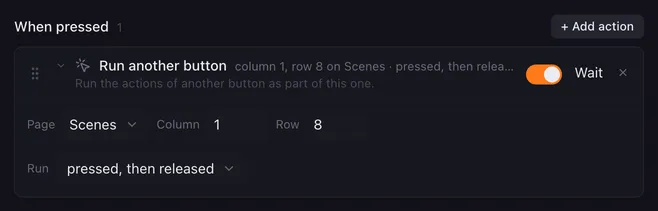
Run another button runs the actions of a different button as if it were part of this one. Build a macro once and reuse it: a “Go live” button can run your “Starting soon” scene button and your “Mic on” button instead of copying their actions.
Settings
Section titled “Settings”| Setting | What it does |
|---|---|
| Page | Same page means the page of the button that is running. Or pick any page. |
| Column, Row | Where the other button sits: the same numbers the button editor shows in its title, counted from the bottom-left pad. |
| Run | Which of its lists to run: pressed actions, released actions, pressed, then released (both, one after the other), or held actions. |
How it runs
Section titled “How it runs”- With Wait on, this macro waits until the other button’s actions have finished. With Wait off, they run alongside and this macro goes on right away.
- The other button’s actions share this run’s variables with the scope This run, and they get the same press force (
{{velocity}}). - Inside the other button’s actions, “this button” means that other button. Its pad shows as running while they run.
- Stopping this macro also stops the other button’s actions.
- If there is no button at that position, or it has no actions in the chosen list, nothing happens.
- If the other button has Repeat while held on and you run its pressed actions, they repeat until this macro is stopped.
- The other button’s Pressed again while still running choice holds here too. While that button is busy, Ignore means nothing happens, Wait in line means its actions wait their turn (and this macro with them, when Wait is on) or are skipped when the line is full, and Start over stops its run in progress. See Action lists.
- A button that runs itself is never held up by the run it is part of.
- Buttons that run each other are cut off after 8 levels, so a button that runs itself cannot loop forever.
Example
Section titled “Example”A “Go live” button:
- Run another button: Scenes page, the “Starting soon” button, pressed, then released.
- Run another button: the “Mic on” button on the same page, pressed actions.
- OBS & Streamlabs: stream, record, replay: start the stream.
Related
Section titled “Related”- Action lists — pressed, released and held actions
- Variables and placeholders — This run and Everywhere scopes
- Stop this macro