
Get screen
Remember a screen's size, position, scale and DPI in a variable.
- Where
- + Add actionWindowGet screen
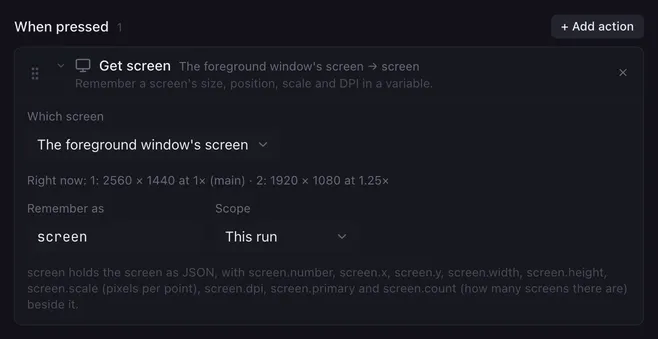
Get screen looks up one display and stores what it knows about it: where it sits, how big it is, how many pixels it packs into a point, and how fine it is. A macro then places windows and the pointer relative to the screen it is on, whatever the monitor setup.
Settings
Section titled “Settings”| Setting | What it does |
|---|---|
| Which screen | The main screen, A screen by number, The foreground window’s screen or The screen under the pointer. |
| Number | For A screen by number: its 1-based number. Placeholders work. |
| Remember as | The variable’s name, see below. |
| Scope | This run keeps the variable to this macro, Everywhere shares it with all macros. See variables. |
The editor lists the screens as they are right now, with their sizes and scales, so you know which number is which.
How it runs
Section titled “How it runs”- The variable gets the screen as a JSON object, and each field alongside it:
name.number,name.x,name.y(its top-left corner, in the coordinates Set window and Mouse sequence use),name.width,name.height,name.scale(pixels per point:2on a Retina display,1.5at 150 % on Windows),name.dpi(physical pixels per inch,0when the system does not say),name.primary(trueorfalse) andname.count(how many screens there are). - Screens are numbered as Windows’ display settings number them; on macOS the main display is 1 and the others follow left to right, top to bottom.
- A screen that does not exist (a number too high, no foreground window) is logged and the variable and its fields are set to an empty text.
- The action is instant.
Example
Section titled “Example”Put the pointer in the middle of whichever screen the pointer is on, then click:
- Get screen, The screen under the pointer, Remember as
s. - Run script:
vars.cx = String(Number(vars["s.x"]) + Number(vars["s.width"]) / 2); vars.cy = String(Number(vars["s.y"]) + Number(vars["s.height"]) / 2); - Mouse sequence: Move to
{{cx}},{{cy}}; Click.
Related
Section titled “Related”- Set window — place a window on a screen
- Get window — a window’s own position, size and screen
- Variables and placeholders