
Set colour
Change and remember the colour of this or any other button.
- Where
- + Add actionGeneralSet colour
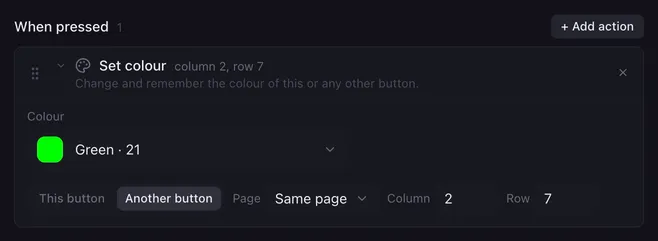
Set colour changes the colour of a button: the one running the macro or any other, on any page. Use it for status lights, for example a pad that turns red while your microphone is muted and green when it is live.
Settings
Section titled “Settings”| Setting | What it does |
|---|---|
| Colour | The new colour. Solid picks from the Launchpad’s palette, Flashing alternates between two colours in time with the Launchpad’s clock, Pulsing breathes between bright and dim, Custom takes any colour and the LED shows the closest it can. First-generation Launchpads only have red and green LEDs. |
| This button / Another button | Which button to colour. |
| Page, Column, Row | For Another button: where it sits. Same page is the page of the button that is running. |
How it runs
Section titled “How it runs”- The colour is saved in your profile. It becomes the button’s normal colour, the one you see under Colour in the button editor, and stays after a restart.
- Only the normal colour changes. A colour set under While active stays as it is.
- The action has no Wait switch; the pad changes at once.
- If there is no button at the target position, nothing changes and the reason goes to the log. Pads that belong to a fader ignore colour actions.
Example
Section titled “Example”See Flip flop: each side mutes or unmutes the microphone and sets the pad’s colour to match.