
Set window
Bring a program's window to the front, minimize, maximize, move or resize it, put it on a screen, or close it.
- Where
- + Add actionWindowSet window
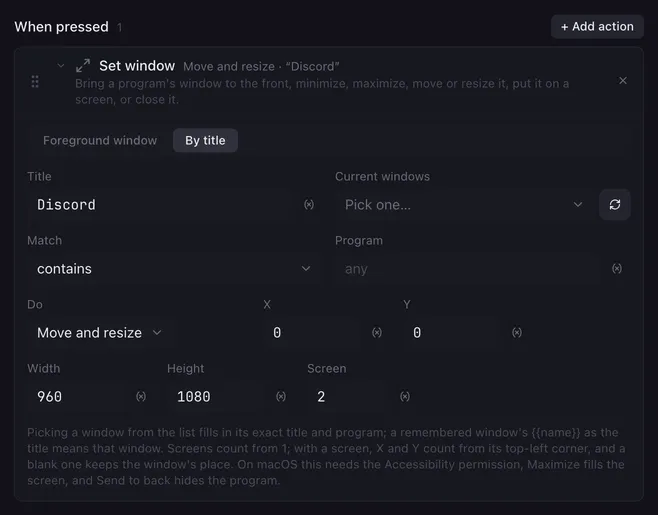
Set window finds one window of another program and does something with it: raises it, minimizes or maximizes it, puts it behind the others, moves it, resizes it, centers it or closes it. A pad that raises OBS before starting the stream, or tiles a chat window onto the second monitor.
Settings
Section titled “Settings”| Setting | What it does |
|---|---|
| Foreground window / By title | Which window is meant. Foreground window takes the one that has the focus at that moment. By title searches the open windows. |
| Title | What to look for in the window’s title. Placeholders work; the comparison ignores upper and lower case. A window remembered by Get window is meant by its {{name}} here. |
| Current windows | The windows that are open right now. Picking one fills in its exact title and program and sets Match to is exactly. The arrow button reads the list again. |
| Match | How the title is compared: contains (the default), starts with, is exactly, or matches a pattern (a regular expression, also case-insensitive). |
| Program | Only windows of this program count, matched by a part of its name. Leave it empty for any program. |
| Do | Bring to front, Minimize, Maximize, Restore (back from minimized), Send to back, Close, Move to, Resize to, Move and resize, Center on screen or Move to screen. |
| X, Y | For Move to and Move and resize: the new position of the window’s top-left corner, in pixels. Without a Screen, counted from the top-left corner of the main display; with one, from that screen’s top-left corner. A field left empty keeps the window’s place. |
| Width, Height | For Resize to and Move and resize: the new size in pixels. A field left empty keeps that side. |
| Screen | A 1-based display number. Move to and Move and resize count X and Y from that screen; Center on screen centers the window on it; Move to screen puts the window there, keeping the place it had on its old screen. Left empty, the window’s own screen is meant. |
How it runs
Section titled “How it runs”- The first window that matches wins, in the same order as Get window. Lunchpad’s own window can be targeted too.
- When no window matches, the action logs it and the macro goes on.
- Title, Program, X, Y, Width, Height and Screen take
{{placeholders}}, so the fields of a Get window variable ({{w.x}},{{w.screen}}, …) put a window back where it was. A position or size that is not a number keeps the current value. - A window moved onto a screen is pulled back in when it would hang over that screen’s right or bottom edge. A screen number that does not exist is logged and nothing moves.
- Screens are numbered as Windows’ display settings number them; on macOS the main display is 1 and the others follow left to right, top to bottom.
- Close asks the window to close, the same as its close button. A program with unsaved work may show its “save changes?” dialog and stay open.
- The action waits until the change has been asked for; the program may take a moment to redraw. Put a short Delay before a click that must land inside the raised window.
Examples
Section titled “Examples”Raise OBS and start streaming on one pad: Set window, By title, Title OBS, Do Bring to front, followed by Stream, record, replay.
Tile a chat window on a second monitor: Title Discord, Do Move and resize, X 0, Y 0, Width 960, Height 1080, Screen 2.
Bring a window over without changing its place: Do Move to screen, Screen 1.
Related
Section titled “Related”- Get window — remember a window to come back to it
- Launch application — start the program whose window you want
- Hotkey sequence — send keys to the window you just raised