
Get window
Find a program's window, in front or by title, and remember its handle, title, program, position, size and screen in a variable.
- Where
- + Add actionWindowGet window
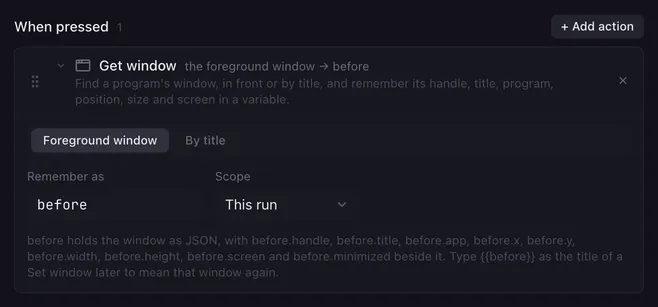
Get window looks up one window of another program and stores it in a variable. Later actions and other buttons can then point at exactly that window, even after its title has changed: a Set window can bring it back to the front, and a Mouse sequence can click inside it using its position.
Settings
Section titled “Settings”| Setting | What it does |
|---|---|
| Foreground window / By title | Which window is meant. Foreground window takes the one that has the focus at that moment, whatever it is. By title searches the open windows. |
| Title | What to look for in the window’s title. Placeholders work; the comparison ignores upper and lower case. |
| Current windows | The windows that are open right now. Picking one fills in its exact title and program and sets Match to is exactly. The arrow button reads the list again. |
| Match | How the title is compared: contains (the default), starts with, is exactly, or matches a pattern (a regular expression, also case-insensitive). |
| Program | Only windows of this program count, matched by a part of its name (obs, Discord). Leave it empty for any program. |
| Remember as | The variable’s name, see below. |
| Scope | This run keeps the variable to this macro, Everywhere shares it with all macros. See variables. |
How it runs
Section titled “How it runs”- The variable gets the whole window as a JSON object, and each field alongside it:
name.handle,name.title,name.app,name.x,name.y,name.width,name.height,name.screenandname.minimized. Position and size are in pixels from the top-left corner of the main display; the screen is the 1-based number of the display the window is on. - The handle stays valid while the window exists, even when its title changes. Use
{{name}}as the Title of a Set window action to mean that window, and{{name.x}},{{name.width}},{{name.screen}}and friends in its fields to put a window back where it was. - In a script,
JSON.parse(vars.name)gives the object, for example to compute a new position from it. - The first window that matches wins. On Windows the list is in stacking order, so the frontmost matching window is taken; on macOS the windows are listed program by program.
- Only windows that appear in the taskbar or the Dock count: visible, top-level windows with a title. Lunchpad’s own window is among them.
- When no window matches, the action logs it, sets the variable and its six companions to an empty text so a Condition can check it, and the macro goes on.
- The action is instant.
Examples
Section titled “Examples”Put a window back. Get window with By title Discord, Remember as w; later a Set window with Title {{w}}, Do Move and resize, X {{w.x}}, Y {{w.y}}, Width {{w.width}}, Height {{w.height}}.
Return to where you were. At the start of a macro that raises other windows, Get window with Foreground window, Remember as before. At the end, a Set window with By title, Title {{before}} and Do Bring to front.
Related
Section titled “Related”- Set window — change the window you found
- Mouse sequence — click inside it with
{{name.x}}and{{name.y}} - Variables and placeholders