
Set audio
Mute or unmute an audio source and set its volume.
- Where
- + Add actionOBS StudioOBS: set audio+ Add actionStreamlabsStreamlabs: set audio
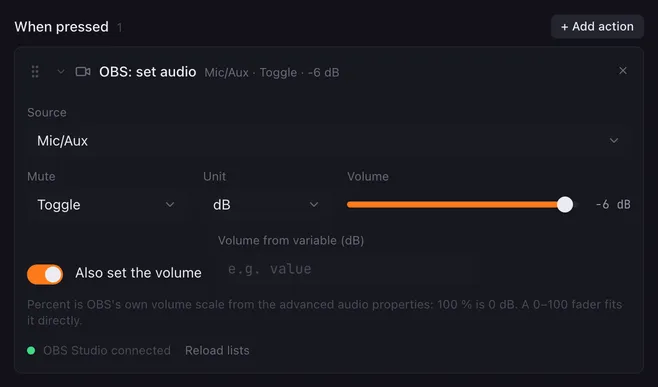
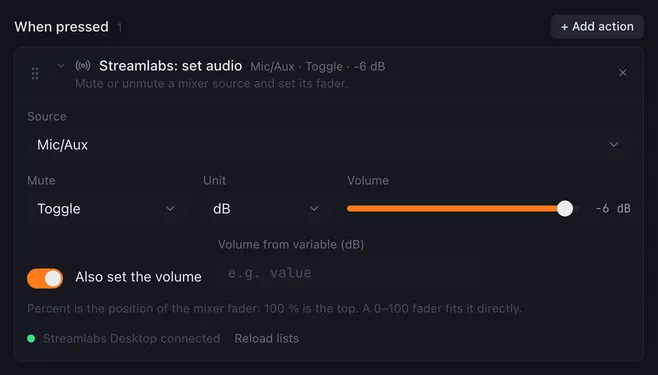
Set audio controls one source in the app’s audio mixer: a mute button for your microphone, a fixed “music quiet” level, or a volume that follows a fader on your Launchpad.
Settings
Section titled “Settings”| Setting | What it does |
|---|---|
| Source | The audio source, as listed in the app’s mixer. |
| Mute | Leave as is, Mute, Unmute or Toggle. |
| Also set the volume | Off: only the mute state changes. On: the volume is set as well. |
| Unit | dB or %. What percent means depends on the app, see below. |
| Volume | The level to set. The slider covers −100 to 0 dB, or 0 to 100 %. |
| Volume from variable | A variable whose number replaces the slider, for example value from a fader. |
dB and percent in each app
Section titled “dB and percent in each app”| Unit | OBS Studio | Streamlabs Desktop |
|---|---|---|
| dB | The volume in decibels, −100 to +26 dB. | Placed on the mixer fader the way Streamlabs draws it: 0 dB and above is the top, −20 dB the middle. |
| % | OBS’s own volume scale from the advanced audio properties: 100 % is 0 dB, up to 2000 %. | The position of the mixer fader: 100 % is the top, 0 % the bottom. |
When you change the unit in the editor, Lunchpad converts the slider so the level stays about the same.
How it runs
Section titled “How it runs”- Toggle reads the current mute state and flips it.
- Volume from variable only counts when the variable holds a number; otherwise the slider’s value is used. A number from a variable can go beyond the slider, within the limits in the table.
{{placeholders}}work in the source name.- Errors are noted in the log and the macro goes on.
Example
Section titled “Example”Microphone volume on a fader: create a fader named mic from 0 to 100 with the unit %, and on its Actions tab give it this action under When the level changes:
- Source
Mic/Aux, Mute Leave as is, Also set the volume on, Unit %, Volume from variablevalue.
For a fader from −60 to 0, set the unit to dB instead. See faders.
Related
Section titled “Related”- System audio — the computer’s own volume
- Set fader — move a fader from a button
- Faders