
Stop all sounds
Silences every sound Lunchpad is playing.
- Where
- + Add actionMediaStop all sounds
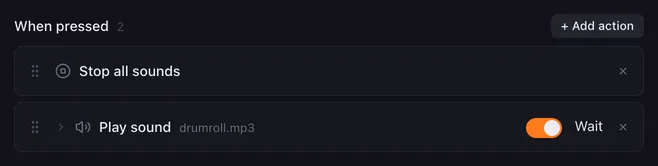
Stop all sounds silences every sound Lunchpad is playing right now, no matter which button started it. Use it as a panic button for a clip that runs too long, or put it before a Play sound so sounds never pile up.
This action has no settings.
How it runs
Section titled “How it runs”- It stops every sound from Play sound actions on every button. Those Play sound actions count as finished, so their macros go on with their next action.
- It stops sounds only. Text to speech keeps talking and the macros keep running. To end everything, use Stop all macros, which also silences sounds and speech.
Example
Section titled “Example”A soundboard where a new sound cuts off the previous one: on every sound button, put Stop all sounds first and Play sound second, as in the screenshot.
Related
Section titled “Related”- Play sound
- Stop all macros — stop macros, sounds and speech
- Stop this macro — stop only this button’s sound