
Loop
Repeats the actions up to “If it takes too long”, with a pause between rounds.
- Where
- + Add actionFlowLoop
- Comes with
- If it takes too long, End loop, added and removed as one set
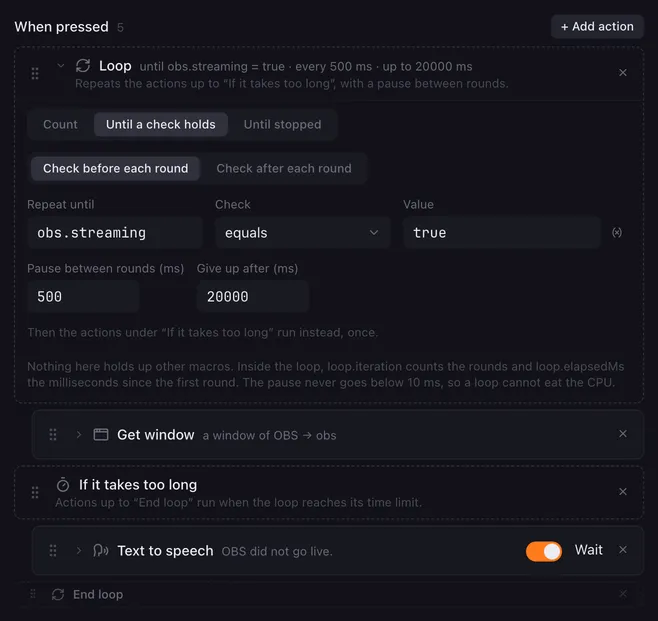
A loop repeats the actions inside it, round after round, with a pause between rounds. It can count, wait for a variable to pass a check, or simply run until the macro is stopped. A time limit keeps it from running forever: when it hits, a separate branch runs instead, where a Stop this macro or a warning belongs.
The three markers
Section titled “The three markers”Adding a loop adds three rows at once:
- Loop: holds the settings. The actions below it, up to If it takes too long, are the body that repeats.
- If it takes too long: the actions between it and End loop run once when the time limit hits. Leave this part empty if the loop should just give up quietly.
- End loop: everything after it runs either way.
Drag other actions between the markers to put them in the loop. The markers keep their order and cannot be dragged past each other. Removing one of them removes all three; the actions in between stay. An empty If it takes too long and the End loop row fold to a single line until something is dragged, so a loop without a timeout branch takes little room.
Settings
Section titled “Settings”| Setting | What it does |
|---|---|
| Count / Until a check holds / Until stopped | What makes the loop go round; see below. |
| From, To, Step | For Count: the first number, the last number and how far each round moves. Placeholders work, for example {{n}} as To. A negative step counts down; a step of 0 counts as 1. When From already lies past To, the body never runs. |
| Check before each round / Check after each round | For Until a check holds: whether the check runs before a round (the body may never run when the check holds from the start) or after it (the body runs at least once). |
| Repeat until, Check, Value | For Until a check holds: the variable and the check, exactly as in a Condition. The loop ends once the check holds. |
| Pause between rounds (ms) | How long the loop rests between two rounds. 100 ms by default, and never less than 10 ms: a loop without a delay of its own cannot eat the CPU. |
| Give up after (ms) | The time limit, counted from the first round. 10 seconds by default; 0 means no limit, the loop then runs until it is done or the macro is stopped. |
What the loop provides
Section titled “What the loop provides”Inside the loop, three values are available as {{placeholders}} and to a script, for this run only:
| Name | What it holds |
|---|---|
loop.iteration |
The round, counting from 1. |
loop.elapsedMs |
Milliseconds since the first round. |
loop.value |
For Count: the current number. |
How it runs
Section titled “How it runs”- Count runs the body once per number: with From 1, To 3 and Step 1, three times with
loop.valueat 1, 2 and 3. - Until a check holds reads the variable at the moment of the check, so an action inside the body, or another macro, can change it. With the check before each round the loop behaves like a while loop, with the check after each round like a do … until loop.
- Until stopped is a loop with no way out but Stop this macro, Stop all macros or the time limit.
- Neither a check nor the pause holds up other macros or the interface, and stopping the macro ends the loop at once, even in the middle of a pause.
- When the time limit hits, the actions under If it takes too long run once and the list goes on after End loop. When the loop is done on its own, that branch is skipped.
- Loops can sit inside a Condition or another loop, and a condition can sit inside a loop.
Examples
Section titled “Examples”Wait for OBS to be live, then announce it, giving up after 20 seconds:
- Loop: Until a check holds,
obs.streamingequalstrue, checked before each round, every500ms, give up after20000ms - Get window: the OBS window, kept in
obs - If it takes too long
- Text to speech: “OBS did not go live.”
- End loop
- Text to speech: “We are live.”
Count down from 3 with a sound on every step:
- Loop: Count, from
3to1, step-1, every1000ms - Text to speech:
{{loop.value}} - If it takes too long
- End loop
- Play sound: the airhorn
Related
Section titled “Related”- Condition — the same check, once
- Delay — a pause inside the body sets the pace of a round
- Variables and placeholders — where
loop.valueand the others can be used - Stop this macro — the usual tenant of the timeout branch