
Set fader
Move a fader to a value, as if its pad had been pressed.
- Where
- + Add actionGeneralSet fader
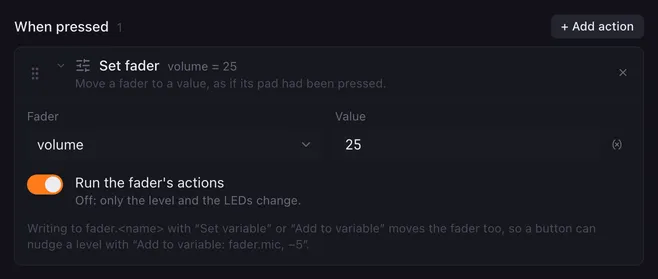
Set fader moves one of your faders to a value. The pads light up to the new level and, unless you switch it off, the fader’s own actions run, exactly as if you had pressed the pad. Use it for presets: a “Music low” button that pulls the music fader down to 20.
Settings
Section titled “Settings”| Setting | What it does |
|---|---|
| Fader | Any fader on any page, by name. A fader that no longer exists shows as “(not in Lunchpad)”. |
| Value | The new level, in the fader’s own range (for a 0 to 100 % fader, 25 means 25 %). Values outside the range are clamped to it. Placeholders work, for example {{level}}. |
| Run the fader’s actions | Off: only the level and the LEDs change; the actions under When the level changes do not run. |
How it runs
Section titled “How it runs”- The action has no Wait switch. The fader’s actions start as their own macro; this macro does not wait for them.
- If the fader is already at that value, nothing happens and its actions do not run.
- The fader’s actions receive the new level in
value,percentand the other fader variables, and every macro can read it asfader.<name>. - If the value is not a number, or no fader has that name, nothing changes and the reason goes to the log. If two faders share a name, the first one found is used.
Related
Section titled “Related”- Faders — create faders and their actions
- System audio — what a volume fader usually controls
- Variables and placeholders