
Mouse sequence
Move, click, scroll and drag the mouse, step by step.
- Where
- + Add actionKeyboard & mouseMouse sequence
- Wait
- Has a Wait switch: on, the next action starts once this one is done
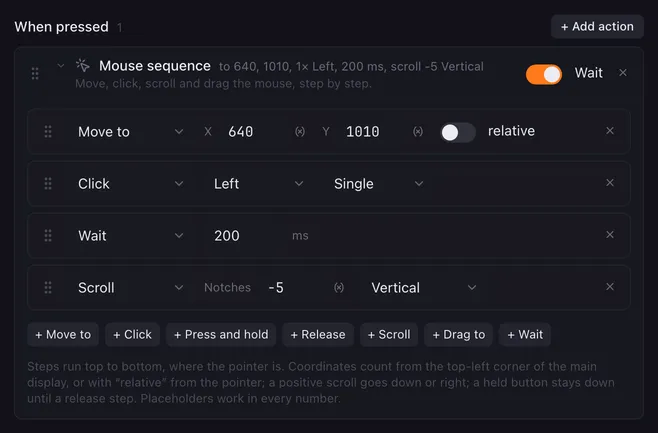
Mouse sequence runs a list of mouse steps in order: put the pointer somewhere, click, hold or release a button, turn the wheel, drag, wait. It operates a program that has no keyboard shortcut for what you want, the way Hotkey sequence does with keys.
Add steps with the buttons under the list and drag the handle on the left to reorder them.
| Step | What it does |
|---|---|
| Move to | Puts the pointer at X, Y, in pixels from the top-left corner of the main display. With relative on, it moves by that much from where the pointer is, so -100, 0 goes 100 pixels to the left. |
| Click | Clicks the Left, Right or Middle button where the pointer is: Single, Double or Triple. |
| Press and hold | Presses a button and keeps it down. |
| Release | Lets a held button go. |
| Scroll | Turns the wheel by a number of Notches: positive scrolls down, negative up. On the Horizontal axis, positive scrolls to the right. |
| Drag to | Presses a button where the pointer is, moves it to X, Y and lets go. |
| Wait | Pauses for a number of milliseconds, up to 5000, before the next step. |
How it runs
Section titled “How it runs”- The pointer jumps; there is no animation. Clicks land wherever the pointer is, so put a Move to before them.
- Multiple clicks are 60 ms apart, which every program counts as a double or triple click. A drag presses, moves 80 ms later and releases 80 ms after that.
- Every number takes
{{placeholders}}: the.xand.yof a Get window or Get mouse position. A value that is not a number is logged and that step does nothing. - A button held with Press and hold stays down until a Release step, also when the macro stops. Pair them, or use Drag to, which releases on its own.
- With Wait on, the next action starts when the last step is done. Stopping the macro ends the sequence at the current step.
- Decimals are rounded. On Windows, monitors to the left of or above the main one have negative coordinates.
Examples
Section titled “Examples”Click a program’s button at a fixed spot and put the pointer back afterwards:
- Get mouse position, Remember as
before. - Mouse sequence: Move to
640,1010; Click Left, Single; Move to{{before.x}},{{before.y}}.
Set a slider in a program: Move to the slider’s knob, then Drag to the spot on its track you want.
Open a link under the pointer in a new tab: a single Click with the button Middle.
Related
Section titled “Related”- Get mouse position — where the pointer is now
- Get window — the position of a program’s window
- Hotkey sequence — keys instead of clicks