
Set a value
Brightness, colour temperature, cover position, fan speed, volume, a number or a temperature, fixed or from a fader.
- Where
- + Add actionHome AssistantHome Assistant: set a value
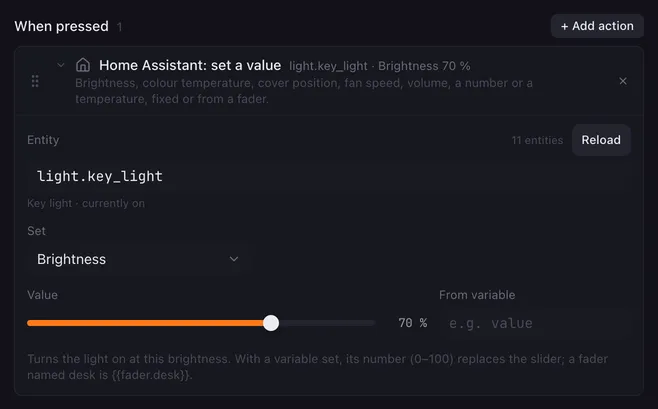
Set a value sends a number to an entity: dim the key light to 70 %, close the blind halfway, set the speaker to 30 %. Put it under a fader and the pads of your Launchpad become a dimmer.
Settings
Section titled “Settings”| Setting | What it does |
|---|---|
| Entity | The entity to set. Suggestions only show entities that fit Set, for example lights for Brightness; any id you type is sent as it is. |
| Set | What to set, see the table below. |
| Value | The value to send. A slider for most kinds, a text field for Number. |
| From variable | A variable whose number replaces the value, for example value in a fader’s actions, or fader.desk anywhere. When it holds no number, the value above is used. |
What each kind does
Section titled “What each kind does”| Set | Entities | Range in the editor | What Lunchpad sends |
|---|---|---|---|
| Brightness | lights | 0 to 100 % | light.turn_on with brightness_pct. The light turns on at that brightness. |
| Colour temperature | lights | 2000 to 6500 K | light.turn_on with color_temp_kelvin. The light turns on at that colour. |
| Cover position | covers | 0 (closed) to 100 (open) | cover.set_cover_position |
| Fan speed | fans | 0 to 100 % | fan.set_percentage. 0 turns the fan off. |
| Volume | media players | 0 to 100 % | media_player.volume_set, as a volume level from 0 to 1 |
| Number | number, input_number |
typed | set_value in the entity’s own domain, in its own unit and range |
| Target temperature | climate | 5 to 35° | climate.set_temperature, in the unit Home Assistant uses |
Numbers from a variable are not limited to the slider’s range, with two exceptions: the percentage kinds (brightness, position, fan speed, volume) are kept between 0 and 100, and brightness, position and fan speed are rounded to whole numbers.
How it runs
Section titled “How it runs”- The action sends one service call and goes on when Home Assistant has answered.
{{placeholders}}work in the entity. From variable takes a name likevalueor a placeholder.- If Home Assistant cannot be reached or refuses the call, the reason goes to the log and shows as the status under Settings → Home Assistant. The macro goes on.
Example
Section titled “Example”A dimmer for the desk lamp on four pads:
- Right-click a pad, New fader here…, name it
desk, 4 pads, Value at the first pad 0, Value at the last pad 100, Unit%. - On the fader’s Actions tab, add Home Assistant: set a value with Entity
light.desk_lamp, Set Brightness and From variablevalue.
Every press on the fader sets the lamp to that level. Other buttons can move it too, see Set fader.
Related
Section titled “Related”- Turn on or off — switch an entity
- Call a service — other fields, like a colour
- Faders